

Introduction
Many customers use Google Analytics to capture user behavior on a website, it would be really useful if some of that information was available within Salesforce. In this specific example, we are considering the following requirement:
Capture the preferences that the customer is selecting when browsing products available on the website. This should include certain features such as color, size and style. This information is captured within Google Analytics using Events. When the customer submits a request, such as a form to us, we need to be able to indicate that this customer has become a Lead and then link the Google Analytics Events to that Lead.
Disclaimer
The code and concepts contained herein are provided “as is” and should be considered Proof of Concept and NOT best practice or production class.
There will no doubt be a requirement to better handle error conditions and check that any code is optimal.
So, please don’t just “Cut & Paste” and deploy into your production Org, although I suspect it will all work.
Basic Architecture
To simplify matters, we will consider that the architecture has four main components:
- Google API
- Google Analytics
- Web Site
- Salesforce
Each of these components is obviously made up of many more sub-components and plenty of configuration; having an architecture in their own right. However, there are key configurations that need to be made within each of these three main areas and therefore simplifies things considerable to break down the solution in this way.
At a high-level, the solution looks like the following:
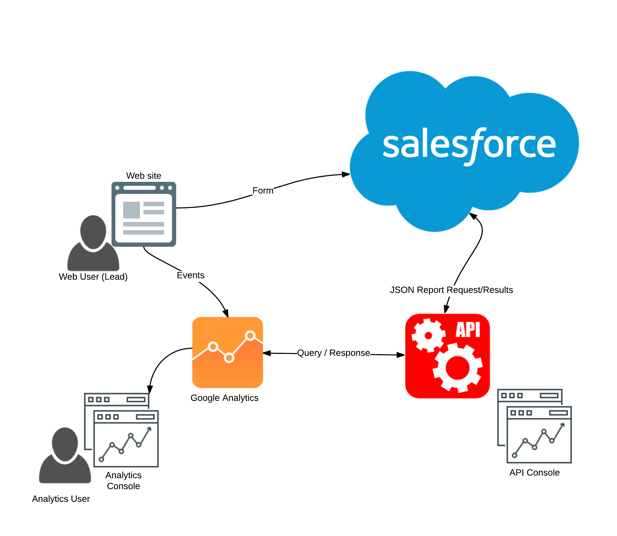
The flow of events is as follows:
- The Web Site triggers events to Google Analytics as the User (Lead) browses the site
- The Web Site submits a form to Salesforce (Web-to-Lead) that has been completed and submitted by the Lead
- Salesforce creates a Lead and makes a request to Google API to retrieve the Google Analytics information as desired.

 salesforceHarding